
Amazon Returnless Refund Are Costing Sellers More Than You Think (Here’s How They Actually Work)
Descriptions
Amazon Returnless Refund is one of those things you don’t really notice until you’re already losing money. You plan for returns, build them into your margins, and move on.
Then one day, you are looking at your reports, and refunds are being issued from your account, but nothing is coming back. No product. No return label. Nothing.
This isn’t an edge case. It’s just how Amazon handles returns now.
In this article, we’re breaking down exactly how the returnless refund on Amazon works, where it hits your account, what items are returnless refund Amazon eligible, and what you can actually do to stop it from affecting your margins.
Quick Guide :
- What Is an Amazon Returnless Refund (From a Seller’s POV)
- What “Returnless Refund” Really Means for Your Margins
- How Amazon Decides Whether to Return an Item or Issue a Refund
- Returnless Refunds Amazon Enables Automatically (FBA vs FBM)
- What Items Are Returnless Refund Amazon Eligible
- Amazon Returnless Refund Limit: What Sellers Need to Watch
- How High Refund Rates Impact Your Account Health
- When Returnless Refunds Start Hurting Profitability
- Final Takeaway: Should You Enable Returnless Refunds as an Amazon Seller?
- FAQ
What Is an Amazon Returnless Refund (From a Seller’s POV)
Amazon Returnless Refund essentially refers to the process where the buyer gets their money back and gets to keep the item. Simple as that. But from your side as a seller, this is not just a refund. It is a complete loss on that unit. Unlike a normal return, where you at least get something back to inspect or resell, here you get nothing.
Amazon does this because in many cases, processing a return costs as much as or more than the product itself. Shipping, handling, inspection, and restocking all add up, so skipping the return becomes the more cost-effective option while keeping the customer experience fast.
This does not affect all products equally. Items that are low in value, bulky, or difficult to resell are far more likely to fall into this category, which increases the chances of losing both the product and the revenue.
At this point, the key questions are control and prevention. If you are using FBA, these decisions are made automatically by Amazon and cannot be turned off. If you are using FBM, you have some flexibility to set return rules and reduce unnecessary losses, but only within Amazon’s policies.
In the next sections, we break down which product categories are most affected, how Amazon makes these decisions, and what you can do to reduce the impact on your margins.
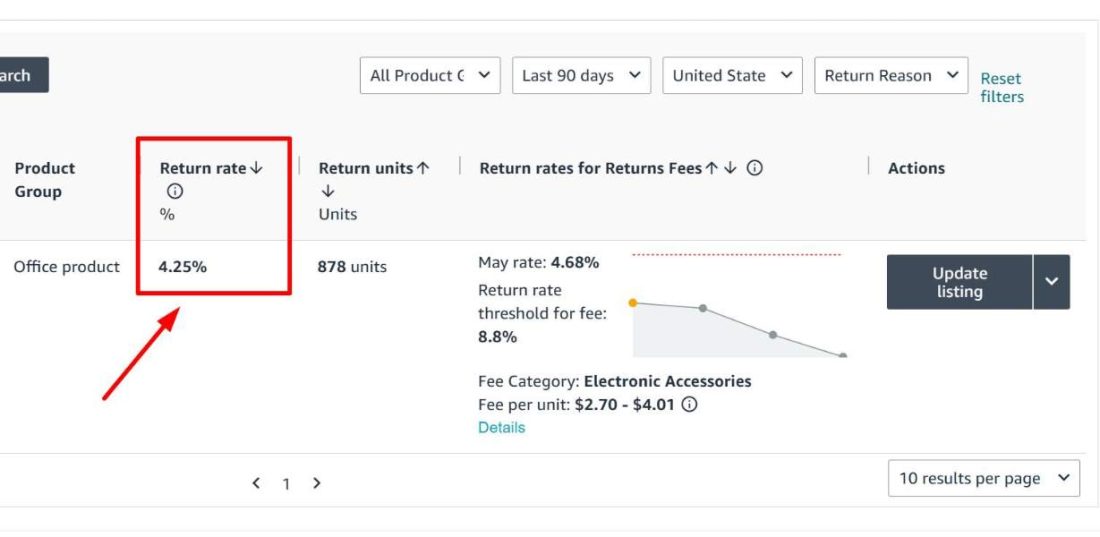
What “Returnless Refund” Really Means for Your Margins
When a returnless refund on Amazon happens, you’re not just losing a sale. Let’s actually put numbers to it.
Say you sell a product for $28. Landed cost is $11. After fees, you’re making around $6 per unit.
Now that the unit gets refunded without return. The $11 cost is gone. Revenue reversed. And depending on timing, some fees don’t come back either.
That one refund didn’t just wipe your profit, it wiped the cost you already paid to source the unit. You’re in the negative on something you thought was working.
Now scale that up. If this happens on just 3 percent of your monthly orders, on 800 units, that’s 24 units gone. At a $11 cost per unit, you’re losing $264 a month.
Over a year, that’s over $3,000, and that’s before you factor in any operational overhead.
That’s a real margin leak, and most sellers don’t catch it because it’s buried inside their payment reports, looking just like any other refund.
How Amazon Decides Whether to Return an Item or Issue a Refund
Amazon’s decision comes down to cost efficiency. Returning an item is not free. There is shipping, handling, inspection, and restocking, and for many products, especially low-value or bulky ones, that total cost gets very close to the product price itself.
Every time a return request comes in, Amazon runs a cost-based decision model. It evaluates the product value, return shipping cost, processing and inspection cost, and whether the item can realistically be resold.
Take a $20 product with a $9 return cost and low resale potential. The math does not work in favor of bringing it back, so a returnless refund gets triggered instead.
But price is only one part of the decision. The system also considers the customer’s return history, the product category, and the expected condition of the item. Personal care products, food, and items with hygiene concerns are rarely returned because they cannot be resold even if they come back.
At that point, recovering the unit is no longer the priority. It is cheaper for Amazon to issue a refund and move on, even if the seller absorbs the loss.
Where the Refund Comes From (Hint: It’s Usually You)
The refund gets pulled straight from your seller balance. If the order has already been paid out, Amazon will just adjust it in your next settlement, so you might not even feel it immediately.
To be clear about who’s actually paying here, it’s you, not Amazon. Amazon facilitates the refund, processes it, keeps the customer happy, and moves on. The financial hit lands entirely on your side. You sourced the product, paid to ship it in, paid FBA fees, and now you’re also eating the full cost of that unit with nothing coming back.
Returnless Refunds Amazon Enables Automatically (FBA vs FBM)
Your fulfillment method has a bigger impact on returnless refunds than Amazon’s decisions on Amazon’s decisions than most sellers realize. It affects not just how often they happen but how much say you actually have in the process.
With FBA, Amazon controls the entire return and refund process. That includes returnless refunds. You do not have the option to enable, disable, or adjust these decisions. The system evaluates each return request and makes the call automatically, and you see the outcome after it has already been processed.
With FBM, the setup is different. You have access to return settings in Seller Central where you can define how returns are handled. This includes setting conditions such as price thresholds under which low-value items can be refunded without return, while higher-value items require the product to be returned before a refund is issued.
That said, this control has limits. You are still operating within Amazon’s policies, and you cannot override core rules. FBM gives you flexibility, but not full control.
To understand how much this matters, consider two sellers listing the same product at the same price. One uses FBA, the other uses FBM. The FBA seller has no say in whether a returnless refund is issued. The FBM seller can structure return rules to reduce unnecessary losses. Same product, same market, but very different outcomes based on fulfillment choice.
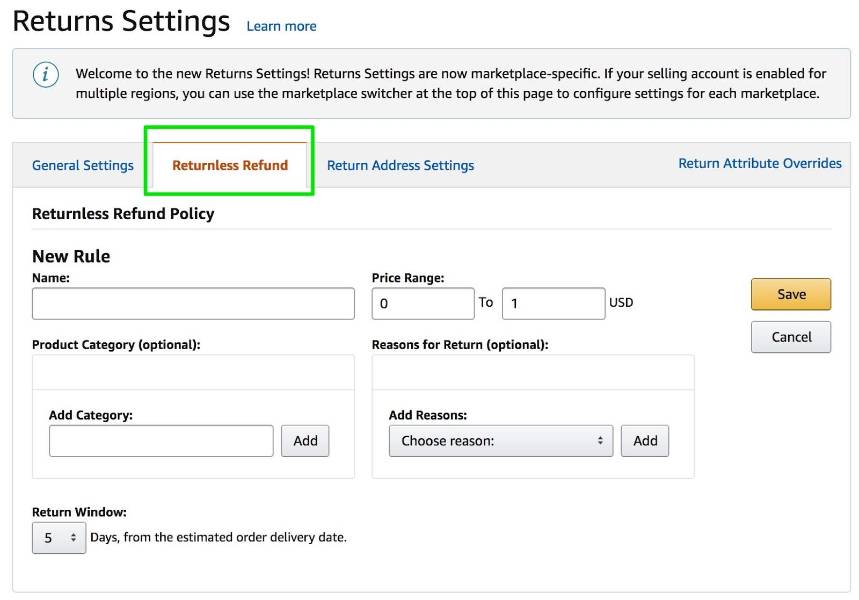
When FBM Sellers Can Set Their Own Rules
FBM sellers have something FBA sellers don’t, and that’s the ability to actually define their own return settings. You get to set the conditions for accepting returns and decide when a refund gets issued.
So, for example, you can set a price threshold and say anything under a certain value gets a returnless refund automatically because it’s just not worth the back and forth. But for higher-value products you require the item to come back before anything gets processed.
That kind of control makes a real difference when you’re trying to protect margins on specific SKUs.
The catch is you’re still playing inside Amazon’s broader policies. You can customize within the rules, but you can’t rewrite them. So while FBM gives you more leverage than FBA, it’s not a complete free pass to handle returns however you want.
How FBA Uses Automation to Approve Returnless Refunds
With FBA, Amazon runs the entire returns process through automated systems. Refund decisions, including returnless refunds, are based on internal factors like product price, return shipping cost, handling and inspection costs, product category, resale potential, and customer return behavior.
These are not settings you can access or change. Amazon uses this data to decide whether it is worth bringing the item back or issuing a refund without return. If the cost of processing the return is too high or the item cannot be resold, the system approves a returnless refund automatically.
You’re not in that conversation at all. By the time you find out a refund was issued the decision has already been made, processed, and closed. Amazon gets to move fast and keep customers happy but the tradeoff is that you as the seller have zero input on whether that refund should have been returnless or not.
That’s exactly why FBA sellers tend to see higher instances of returnless refund on
That is why FBA sellers tend to see more returnless refunds. The system is fully automated, and Amazon makes these decisions based on its own cost and customer experience logic without any input from you.
Returnless refunds are not limited to FBA, but the way they are handled is different. In FBA, everything from return approval to refund processing is controlled by Amazon’s automation. In FBM, you have the ability to define return rules, including when a returnless refund should apply, based on your own thresholds and conditions.
The automation here refers to Amazon’s backend systems that evaluate return requests, calculate costs, and process refunds without manual review. In FBA, this works entirely in Amazon’s favor. In FBM, you still have some control, but only within the limits of Amazon’s policies.
What Items Are Returnless Refund Amazon Eligible
Not every product in your catalog carries the same risk, and that’s actually useful information if you know how to use it. Some items are almost guaranteed to trigger a returnless refund based on their price, size, or category. Others will rarely, if ever, go that route.
Low-Value Products That Trigger Automatic Refunds
If you’re selling anything under $20, you’re in the highest risk zone for returnless refunds on Amazon. Phone cases, charging cables, kitchen tools, small home accessories, anything in that low price range is a prime candidate.
The reason is pretty straightforward. Say a customer wants to return a $12 item. It costs $6 to ship it back and another $3 to inspect and process it. Amazon has now spent $9 to recover a $12 product that may not even be resellable at full price anymore. That math doesn’t work, so they just refund it and move on.
As a seller, this means your sub $20 products need tighter margin control than anything else in your catalog. You’re more exposed to returnless refunds in this price range and if your margins are already thin, a refund rate of even 3 or 4 percent can quietly turn a profitable product into a break-even one.
Categories Where Returns Cost More Than the Product
Price isn’t the only thing that triggers a returnless refund. Some products aren’t cheap, but they’re still likely to end up in that bucket because of how expensive they are to ship back.
Categories of Amazon Returnless Refund Products
| Category | Examples | Why Amazon Avoids Returns |
| Bulky household items | Storage bins, organizers, laundry baskets | High shipping cost vs product value |
| Lightweight oversized products | Cushions, plastic storage boxes | Large size increases logistics cost |
| Low-to-mid value bulky goods | Budget furniture, home essentials | Return cost eats into margins |
| Fragile items | Decor pieces, glass items | Risk of damage during return |
| Low resale value products | Opened household goods | Difficult to resell after return |
Products That Are Damaged, Consumable, or Hard to Resell
Another big group is products that lose value the moment they’re opened or used. Even if the customer barely touched it, returning it doesn’t mean you can resell it. The value is already gone.
This includes:
- Personal care items like skincare or grooming tools
- Food and grocery products
- Items that arrive visibly damaged
- Products with hygiene concerns
For example, if a customer opens a skincare product and claims irritation, Amazon is unlikely to accept a return for resale. Instead, it issues a returnless refund on Amazon and closes the case.
For sellers, this category is risky because even genuine claims result in a full loss.
Products You Should Never Allow for Returnless Refunds
Some products should never be part of a returnless refund setup, and if you have control through FBM settings, this is where you really want to pay attention.
These include:
- High-value electronics
- Branded or premium products
- Items with strong resale potential
- Products with low return shipping cost
For example, a $120 electronic device should always be returned. Even if it is opened, it can often be inspected, refurbished, or resold at a discount.
The key is to separate your catalog into two groups. One where returnless refunds make operational sense, and one where recovering the product is always the better option.
Amazon Returnless Refund Limit: What Sellers Need to Watch
Here’s the thing about the returnless refund Amazon limit. There isn’t one. Amazon hasn’t published a fixed cap, no maximum number of returnless refunds per month, no official threshold you can point to. And that’s honestly what makes it tricky to manage.
Instead of a hard limit, the system runs on patterns. It’s looking at your product price, your category, your return behavior, and even how customers are interacting with your listings. All of that feeds into how often returnless refunds get triggered for your specific catalog.
So you can’t just hit a number and know you’re safe. What looks totally manageable at low volume can quietly turn into a serious margin problem as you scale. The sellers who stay ahead of it aren’t waiting for Amazon to tell them where the line is. They’re tracking their own patterns and catching it before it becomes a real problem.
How High Refund Rates Impact Your Account Health
High refund rates aren’t just a money problem. They’re also a signal to Amazon that something is wrong with your product or your listing and Amazon pays attention to that signal.
When a product keeps getting refunded, returned or not, the system reads it as customer dissatisfaction and too many of them on one ASIN starts raising red flags.
The causes are usually one of these four things.
- Product quality isn’t meeting expectations.
- Images or descriptions are creating the wrong idea of the actual product
- Sizing or fit is off.
- Packaging isn’t surviving the shipping process.
Put some numbers to it. If 8 out of every 100 orders end in a refund that’s an 8 percent refund rate. Even if half of those are returnless refunds, the system isn’t making that distinction. It’s just seeing that nearly 1 in 10 customers wanted their money back.
And that starts showing up in places beyond your bank account.
Your conversion rate drops because Amazon starts showing your listing less. Your organic ranking takes a hit. Your shot at the Buy Box gets weaker as better performing alternatives get prioritized.
Amazon wants products on its platform that create as little friction as possible. If returnless refunds Amazon keeps flagging your listing at a high rate you’re creating friction and the algorithm will quietly start pushing you down in favor of sellers who aren’t.
When Returnless Refunds Start Hurting Profitability
Returnless refunds become a real problem when the percentage starts creeping up relative to your margins. And for low-margin products, it doesn’t need to creep up much before it starts hurting.
Let’s say your margin per unit is $4, and your returnless refund Amazon rate hits 5 percent. That means 5 out of every 100 units are generating zero revenue but you still paid to source every single one of them.
Run that across 1,000 units, and it looks like this.
50 units refunded without return
Cost per unit $8
Total loss $400
Your expected profit on the other 950 units at $4 each is $3,800. Subtract that $400 loss and you’re walking away with $3,400. You just quietly lost over 10 percent of your profit and nothing felt dramatically wrong along the way.
That’s why you track these at a SKU level, find where they’re spiking, and actually go fix the root cause. Sometimes it’s a quality issue. Sometimes it’s a listing that’s creating the wrong expectations. Sometimes you’re just priced too low for the return economics to ever work in your favor.
Final Takeaway: Should You Enable Returnless Refunds as an Amazon Seller?
Returnless refunds are not the problem by themselves. The impact comes from where they happen and how often they happen.
Across low-value items, bulky products, and non-resellable categories, they are often the expected outcome. In those cases, the cost of bringing the item back is higher than the item itself, so the loss is built into the return process.
Where it starts to matter is at scale. Because these refunds do not bring inventory back and do not stand out in reports, they accumulate quietly. What looks like a normal refund pattern on the surface can turn into a consistent margin drain underneath.
That is why the focus shifts from avoiding them to managing them. Tracking them at a SKU level, understanding which products trigger them, and adjusting margins or return settings accordingly is what keeps them from turning into a structural loss.
Returnless refunds do not change. What changes is whether they remain hidden inside your numbers or become something you account for, price into, and control.
If returnless refunds are cutting into your margins, the deeper issue is often inefficient spend elsewhere, making those losses harder to absorb. SellerApp Amazon PPC agency helps you tighten ad spend, improve ACOS, and protect the profits that refunds are quietly eroding.
FAQ
1. What is an Amazon Returnless Refund?
An Amazon Returnless Refund is when a customer receives a refund without returning the product. This Amazon Returnless Refund process is triggered when return shipping, handling, and inspection costs exceed the item’s value.
For sellers, an Amazon Returnless Refund means losing both revenue and inventory on that unit. Unlike standard returns, these cases offer no recovery or resale opportunity.
As decisions increase across categories, sellers must treat every returnless refund as a direct margin loss and track how often the refund events occur in their catalog.
2. What is the Amazon returnless refund policy?
The Amazon returnless refund policy is based on automation, not fixed rules. Under the policy, Amazon evaluates product price, return shipping cost, category, and resale potential before deciding.
The Amazon returnless refund policy allows refunds without returns when bringing the item back is not cost-effective. This Amazon returnless refund policy prioritizes customer experience and faster resolutions.
While it reduces operational friction for Amazon, sellers must absorb the cost. Understanding the Amazon returnless refund policy helps sellers anticipate which products may trigger refunds without returns.
3. What are Amazon returnless refund products?
Amazon returnless refund products are items where returning them is not economically practical. Common Amazon returnless refund products include low-cost accessories, small household items, and products under $20.
Bulky items with high shipping costs also fall under Amazon returnless refund products. Additionally, categories like personal care, food, and damaged goods are often treated as
Amazon returnless refund products because they cannot be resold. Identifying it in your catalog helps you adjust pricing, packaging, or strategy to reduce losses from frequent refund cases.
4. What items are returnless refund Amazon eligible?
Understanding what items are returnless refund Amazon eligible helps sellers predict losses. Typically, what items are returnless refund Amazon eligible includes low-value products, bulky goods with high return costs, and items that cannot be resold.
When analyzing what items are returnless refund Amazon eligible, categories like personal care, groceries, and damaged products stand out. Amazon’s system evaluates cost efficiency to decide what items are returnless refund Amazon eligible. By tracking what items are returnless refund Amazon eligible, sellers can identify risky SKUs and adjust margins accordingly.
5. Is there a returnless refund Amazon limit?
There is no fixed returnless refund Amazon limit defined by Amazon. Instead, the returnless refund Amazon limit works on patterns influenced by product price, category, and return behavior.
Sellers often assume a returnless refund Amazon limit exists, but the system dynamically adjusts outcomes. Monitoring your returnless refund Amazon limit at a SKU level helps detect trends. A high returnless refund Amazon limit impact can reduce profitability and signal performance issues. Understanding how the returnless refund Amazon limit behaves allows sellers to stay proactive rather than reactive.
The post Amazon Returnless Refund Are Costing Sellers More Than You Think (Here’s How They Actually Work) appeared first on SellerApp Blog.
from SellerApp Blog https://ift.tt/yh5ELAd
via IFTTT
Add a review